
Smart Recurring Tasks
Create tasks with flexible repeat schedules - daily, weekly, monthly, or any custom interval. One-tap completion plus a "mark done on date" option for backdated entries.


A recurring task tracker for iOS. Privacy-first, fully offline, and built around one rule - never forget a task that comes back.
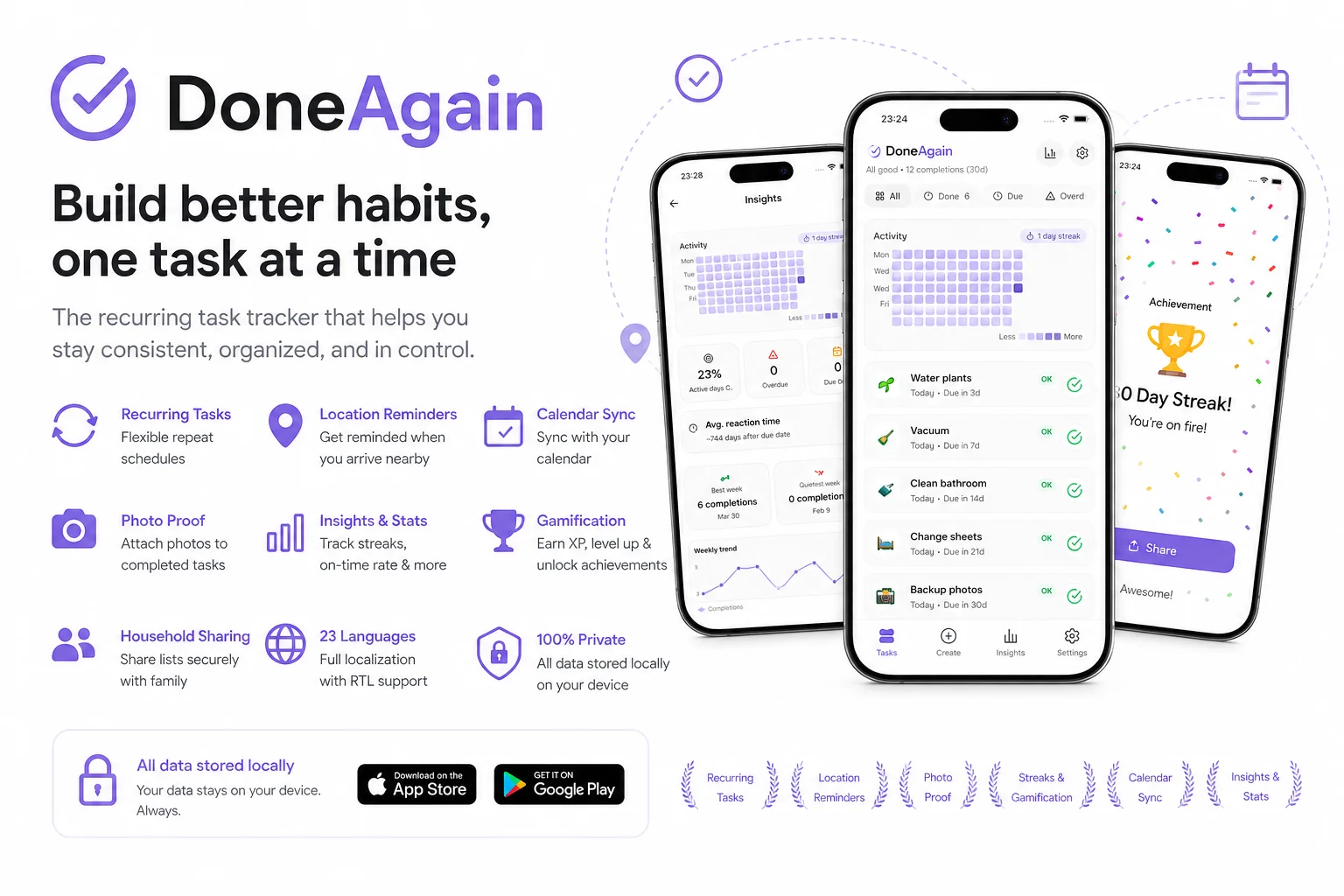
DoneAgain is a recurring task tracker for iOS and Android. The whole app is built around one rule: never forget a task that comes back.
What you get out of the box:
Designed around your privacy. No analytics, no accounts, no cloud, no third-party SDKs. Every task, photo and history entry stays on your device. Atomic backup import and export means a transparent, single-file move to a new phone, with no risk of losing data mid-write.
Available in 23 fully translated languages with full RTL support, scalable fonts, high contrast, reduced motion and VoiceOver / TalkBack labels on every interactive element.
The most important capabilities, explained in practical terms.
Create tasks with flexible repeat schedules - daily, weekly, monthly, or any custom interval. One-tap completion plus a "mark done on date" option for backdated entries.
Get reminded about nearby tasks the moment you arrive at a relevant place - perfect for chores tied to a specific room, shop or part of town.
Sync task due dates straight to your device calendar so you never miss a deadline, and attach proof photos to completed tasks for a visual history.
Daily usage streak with built-in freeze protection (up to 3 freezes), so a single missed day never costs you weeks of progress.
Per-task and global activity heatmaps, weekly trends and average reaction times turn your task history into clear, motivating signals.
A Monday summary card and notification cover completed, overdue and on-time stats. The annual Year in Review screen surfaces total completions, most completed task and best month.
Earn XP, level up and unlock achievements as you complete tasks - with confetti celebrations on every milestone, and a respect-reduced-motion fallback for accessibility.
Coordinate task lists with the people you live with via crypto-generated household IDs, and generate one-tap share cards for the native share sheet, Facebook and Instagram.
Seven theme presets including a true AMOLED black (#000000) that saves battery on OLED screens, plus high contrast, reduced motion, scalable fonts, VoiceOver and TalkBack on every interactive element.
No analytics, no accounts, no cloud, no third-party SDKs. Everything stays on your device, with atomic export and import - safe migrations even if the app crashes mid-write - in 23 fully translated languages with full RTL support.
A clear path from the official source to your first successful workflow.
Use one of the official links available for your device or browser.
Follow the store instructions or open the web application. No third-party installers.
Review the options, choose your preferences and start with the core workflow.
 Scan to install
iOS or Android, we send you to the right store
Scan to install
iOS or Android, we send you to the right store
A transparent look at the core technologies used to build and maintain this product.
Your data stays on your device. Always.