
Diff Checker - Compare two texts or two files, line by line and word by word | POLPROG Skip to content

Diff Checker

Compare two texts or two files, line by line and word by word

Two versions in, every difference out, compared in the browser

Tool Web
Official product page Publisher: POLPROG
Official product page
2
Texts compared
3
Things it can ignore
10k
Lines, instantly
0
Bytes uploaded
01Diff Checker

About

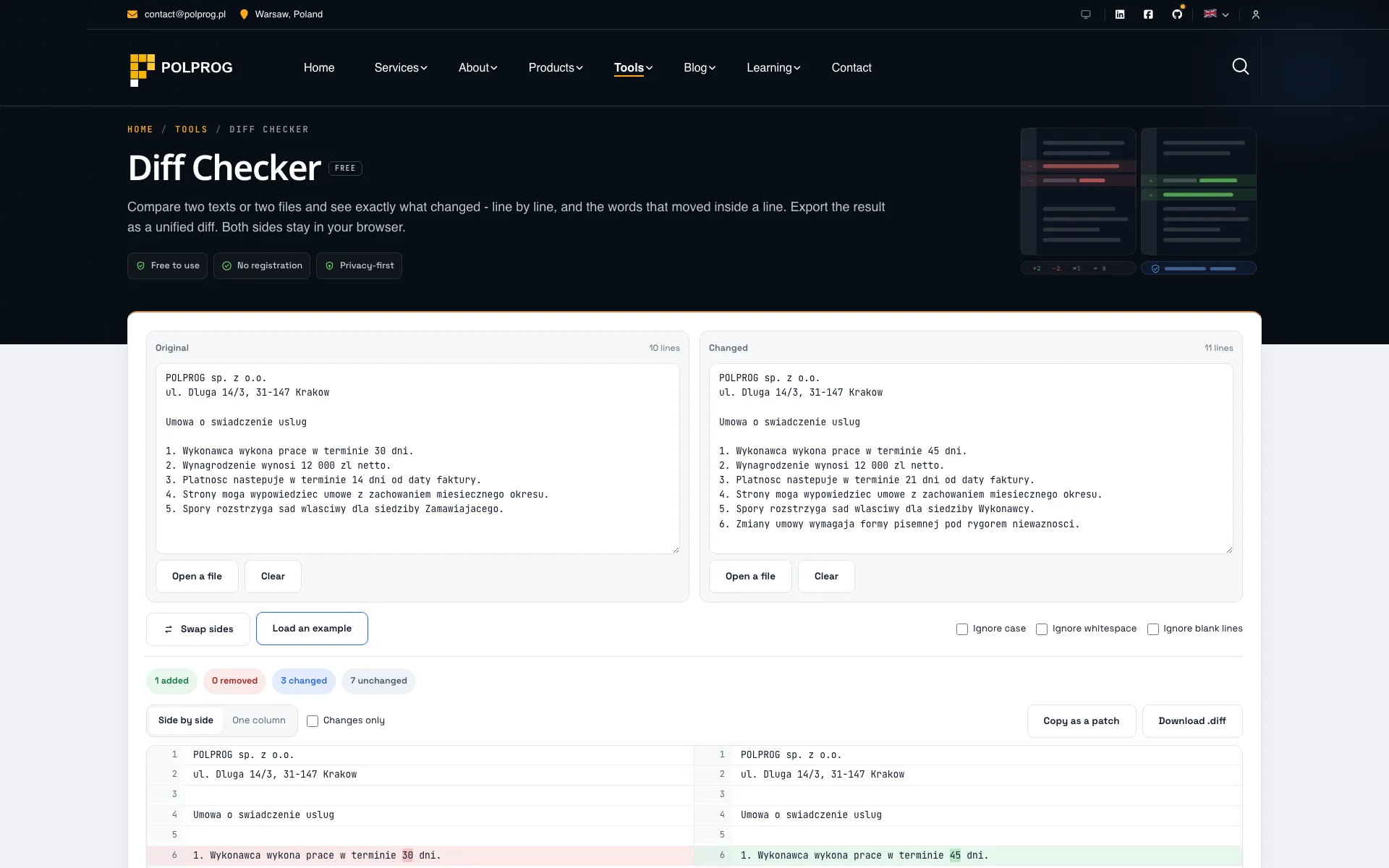
Two boxes, and every difference between them: added lines, removed lines, rewritten lines, and inside a rewritten line the words that actually changed. Side by side or in one column, with a switch for showing only what changed.

The comparison runs in this tab. There is no upload and no request to make: the page has no API call, nothing is written to storage, and closing it leaves nothing behind. That is the difference that matters in a diff tool, because a diff tool is where people paste contracts, credentials out of configuration files and code that is not theirs.

Underneath it is not one algorithm but three. What matches at the start and the end is trimmed first, which turns most real comparisons into a few dozen lines of work. What is left is anchored on the lines that appear exactly once on each side - a line unique in both texts can only match itself - which is what makes a block that was moved read as a move rather than as a deletion plus an addition. The small stretches between those anchors go through Myers' algorithm, which is exact. Ten thousand lines with a change in the middle comes back instantly.

The result exports as a unified diff: the format patch, git apply and every code review tool reads.

02Use case

What it solves

The problem
  • Most online diff tools post both texts to a server, contracts and config files included
  • A naive comparison reports a block that simply moved as everything deleted and everything added, which buries the two lines that really changed under two hundred that did not
  • Marking a whole line as changed when three characters moved leaves you comparing two nearly identical lines by eye, which is exactly the job you opened the tool to avoid
The outcome
  • Both texts stay in the tab: no upload, no request, no storage
  • Lines that appear once on each side anchor the comparison, so a moved block reads as a move and the real changes stay visible
  • Inside a rewritten line the changed words are marked, so you read the difference instead of hunting for it
Who it is for
  • Anyone comparing two versions of a contract, an offer or a policy
  • Developers reading a change without a repository to hand
  • Editors and translators checking what actually changed between two drafts
03Key Features

Key Features

The most important capabilities, explained in practical terms.

Line by line, and word by word

Added, removed and rewritten lines each have their own ground, and a rewritten line carries the words that moved marked inside it. The state is carried by the background, the line number and the plus or minus sign together, never by colour alone.

Two views, one result

Side by side for reading two versions as documents, one column for reading a change the way a code review reads it. A "changes only" switch drops the unchanged lines and keeps one line of context on each side of a run.

Three things you can tell it to ignore

Case, whitespace and blank lines. Whitespace collapses runs of spaces and tabs rather than deleting them, so an indentation change stops being a difference while "ab" and "a b" stay different lines. Line numbers always count every line in your file.

Files, dropped straight onto the box

Text files up to 2 MB per side: .txt, .md, .csv, .json, .xml, .yml, .html, source, logs, subtitles. A PDF or a .docx is refused by name rather than shown as a screen of binary.

A patch you can actually apply

Copy or download the result as a unified diff with three lines of context: the format patch, git apply and every review tool reads. Every hunk header counts the lines the hunk really carries, which is the part broken exporters get wrong.

Built for a large file

Common prefix and suffix trimmed, then patience anchors, then Myers on what is left. Ten thousand lines with one change is instant. The view paints in slices of 600 rows so the browser never stops responding, and if two large texts have nothing in common the tool says so instead of grinding.

04Download

Product access

A clear path from the official source to your first successful workflow.

Choose the right platform

Use one of the official links available for your device or browser.

Install or open

Follow the store instructions or open the web application. No third-party installers.

Configure and begin

Review the options, choose your preferences and start with the core workflow.

Official access options
05Technology

Technology behind the product

A transparent look at the core technologies used to build and maintain this product.

JavaScript
06Security

Privacy & Security

Your data stays on your device. Always.

Nothing is uploaded
Compared in your browser
Nothing is stored
No account, ever